CMV — Contextual Memory Virtualisation







Claude Code Contextual Memory Virtualisation (CMV)
Like virtual memory lets an OS use more RAM than it physically has, CMV lets Claude Code use more context than fits in one session — by snapshotting, branching, and trimming the understanding your sessions build up. For the full design rationale and evaluation, see the paper.
The Problem
Every conversation with Claude builds up state. Not just chat history — actual understanding. Architecture mapped, tradeoffs weighed, decisions made, conventions learned. After 30 minutes of deep work (sometimes less!), Claude has a mental model of your whole codebase sitting in its context window. That took real time and real tokens to build.
And then it's just... gone. The session context fills up, you run /compact, and the model condenses itself into a few sentences. Next session, you start from scratch.
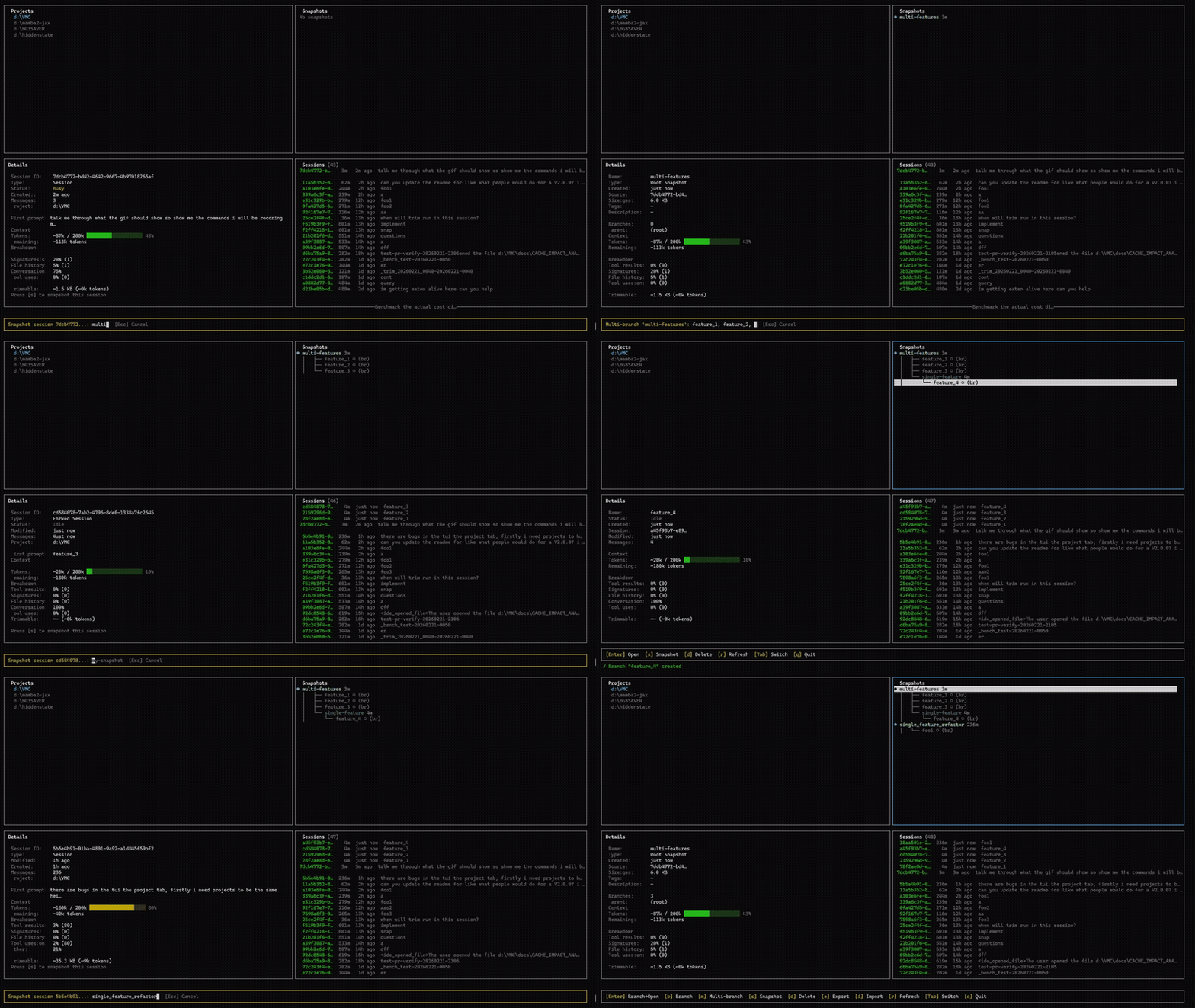
Contextual Memory Virtualisation (CMV) treats that accumulated understanding as something worth keeping around. Named snapshots you can return to, branch from, and trim down — basically version control for context.
- Snapshot captures context state at a point in time (think
git commit) - Branch forks into a new independent session from that state (think
git checkout -b) - Trim strips dead weight from context without losing any of the actual conversation (no git equivalent — this one's new)
- Tree shows how your context evolved over time (think
git log --graph)
Build up context once, reuse it whenever you need it.
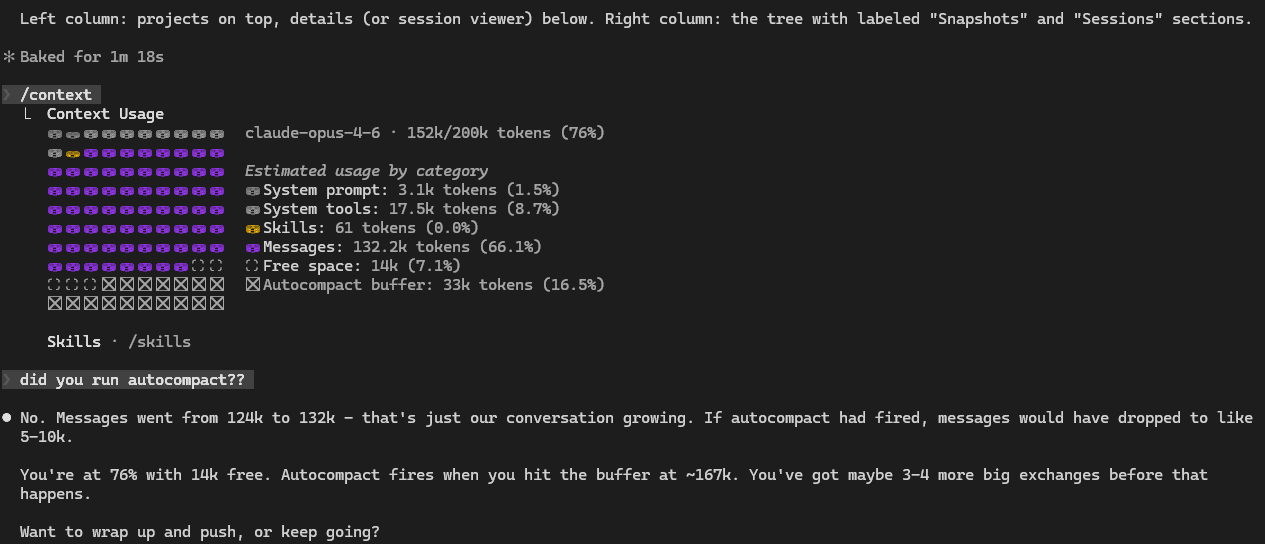
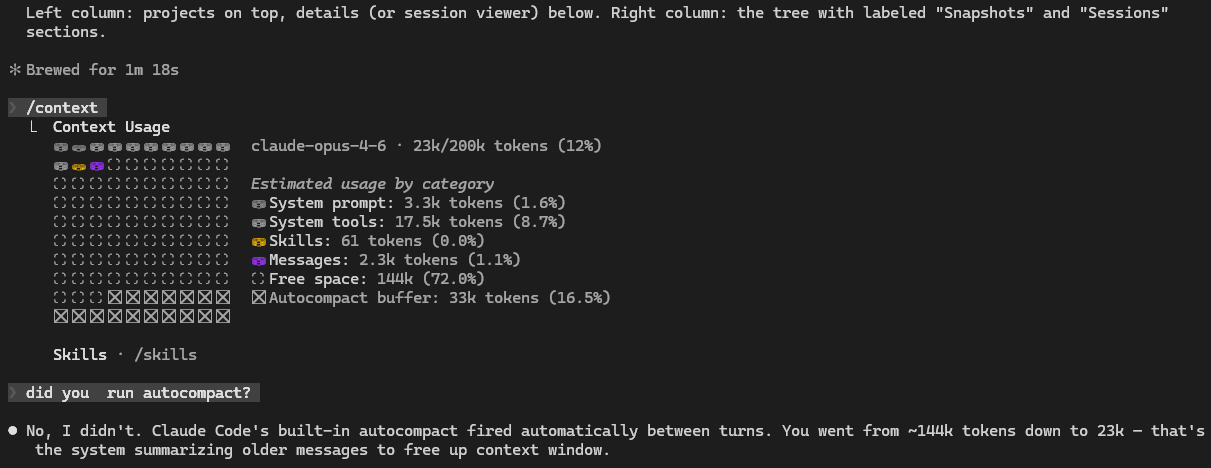
| Before — 152k tokens, 76% full, ~3 turns left | After trim — 23k tokens, 85% reduction |
|---|---|
 |
 |
What's actually happening inside:
Before trim After trim
───────────────────────────────────────── ─────────────────────────────────────────
User: "read auth.ts" User: "read auth.ts"
Claude: [calls Read on src/auth.ts] Claude: [calls Read on src/auth.ts]
Result: [847 lines of raw TypeScript] ← gone Result: [File read: src/auth.ts, 847 lines] ← stub
Claude: "The auth module uses JWT with Claude: "The auth module uses JWT with
refresh tokens in httpOnly refresh tokens in httpOnly
cookies..." ← kept cookies..." ← kept
Claude's synthesis — the part with actual understanding — stays. The raw file dumps, tool outputs, thinking signatures, and image blocks are gone. If Claude needs a file again, it re-reads it.
Note: The "Messages" token count in
/contextincludes tool results, tool calls, and system entries — not just your conversation. The drop from 132k to 2.3k is the tool result bloat being stripped. Every user and assistant message is still there verbatim. For details on what gets removed, see the FAQ. For how trimming interacts with prompt caching, see the Cache Impact Analysis.
Install
Requires Node.js 18+ and Claude Code.
Linux
# Node.js (if you don't have it)
curl -o- https://raw.githubusercontent.com/nvm-sh/nvm/v0.40.1/install.sh | bash
nvm install --lts
# CMV
git clone https://github.com/CosmoNaught/claude-code-cmv.git
cd claude-code-cmv
npm install && npm run build
npm link
cmvnot found? Trysudo npm link, or reopen your terminal if using nvm.
Windows
# Node.js (if you don't have it)
winget install OpenJS.NodeJS.LTS
# CMV (reopen terminal after installing Node)
git clone https://github.com/CosmoNaught/claude-code-cmv.git
cd claude-code-cmv
npm install && npm run build
npm link
cmvnot found? Reopen your terminal. Check that%APPDATA%\npmis on your PATH.
macOS
# Node.js (if you don't have it)
brew install node
# CMV
git clone https://github.com/CosmoNaught/claude-code-cmv.git
cd claude-code-cmv
npm install && npm run build
npm link
Auto-trim hooks are installed automatically after the build. Run cmv hook status to verify.
Quick Start
cmv # launch the TUI dashboard
cmv sessions # list Claude Code sessions
cmv snapshot "analysis" --latest # commit context state
cmv branch "analysis" --name "auth-work" # fork — trimmed by default
cmv branch "analysis" --name "api-work" # fork again — independent, same starting point
cmv branch "analysis" --name "raw" --no-trim # fork without trimming (raw context)
cmv hook status # auto-trim hooks (installed automatically)
cmv tree # view the history
Dashboard
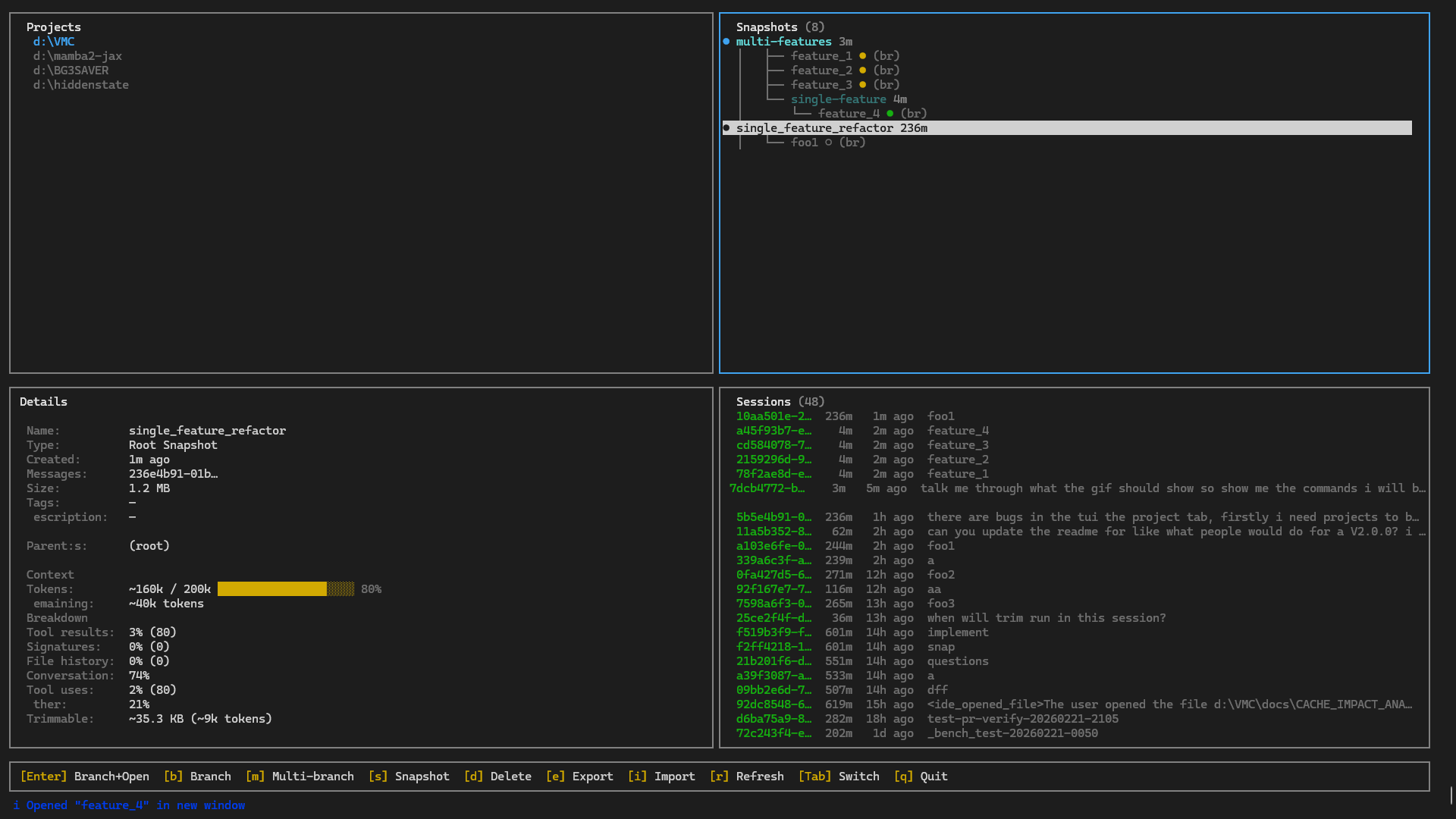
cmv with no arguments launches a two-column, four-pane TUI: projects and details on the left, snapshots and sessions on the right.
| Key | Action |
|---|---|
Enter |
On snapshot: branch and open in new terminal. On branch/session: open in new terminal |
b |
Branch from selected snapshot |
m |
Multi-branch from snapshot (comma-separated names) |
s |
Snapshot selected session |
d |
Delete snapshot, branch, or session |
e / i |
Export / import .cmv files |
r |
Refresh |
Tab |
Switch between project and tree panes |
j/k |
Navigate up/down (also arrow keys) |
q |
Quit |
The detail pane shows a project summary when browsing projects, or a full context breakdown when a snapshot, branch, or session is selected. Branch and session status (active/busy/idle) is shown with live polling.
Commands
cmv sessions
List Claude Code sessions. Filter by project, sort by size, output as JSON.
cmv sessions -p myproject --sort size
cmv snapshot <name>
Commit context state. Copies the session JSONL to CMV storage with metadata. Doesn't touch the original session.
cmv snapshot "analysis" --latest -d "Full codebase walkthrough"
cmv branch <snapshot>
Fork from a snapshot. Trims automatically by default — strips dead weight (tool results, thinking signatures, file history) while keeping the full conversation. Same starting point, independent from there.
cmv branch "analysis" --name "auth-work" # trimmed by default
cmv branch "analysis" --name "auth-work" --threshold 200 # more aggressive trimming
cmv branch "analysis" --name "raw" --no-trim # raw context, no trimming
cmv branch "analysis" --name "later" --skip-launch
cmv trim
Snapshot, trim, and launch in one step. The "better /compact" workflow — exit the session, then:
cmv trim --latest
cmv trim --latest --threshold 200 # lower threshold = more aggressive trimming
cmv list
All snapshots. Filter by tag, sort by name or branch count.
cmv list --tag auth --sort branches
cmv tree
Snapshot/branch hierarchy. git log --graph for context.
cmv info <name>
Full details on a snapshot — source session, message count, size, lineage, branches.
cmv delete <name>
Delete a snapshot. Individual branches can be deleted with d in the dashboard.
cmv export <name> / cmv import <path>
Move context between machines. Portable .cmv archives.
cmv export "analysis" -o ./team-context.cmv
cmv import ./team-context.cmv
cmv benchmark
Analyze cache impact of trimming a session. Shows context breakdown, cost projections, and break-even analysis.
cmv benchmark --latest # analyze most recent session
cmv benchmark --latest --model opus # use Opus 4.6 pricing
cmv benchmark --latest --json # JSON output for scripting
cmv hook
Manage auto-trim hooks for Claude Code. Hooks are installed automatically during setup — after npm run build, the next npm install (or npm link) registers them. Once active, CMV trims sessions in the background — before compaction fires and when context gets heavy — so you rarely need to trim manually.
If you need to reinstall or manage them manually:
cmv hook install # register PreCompact + PostToolUse hooks
cmv hook status # check if hooks are installed, show last trim stats
cmv hook uninstall # remove CMV hooks (preserves other hooks)
cmv hook restore <id> # restore a session from auto-backup
cmv hook restore --list # list available backups
Run cmv config --help for settings. cmv completions --install for shell tab-completion.
FAQ
Won't trimming break prompt caching? One-time cache miss of ~$0.07-0.22 when the trimmed session starts, recovered within a few turns as the smaller prefix gets cached. Pro/Max subscribers pay no per-token cost — caching only affects rate limits, so trimming is purely a context window win. Full analysis: Cache Impact Analysis.
Does Claude lose understanding after a trim?
No. Trimming removes tool results (raw file dumps, command output), not Claude's responses about them. If Claude read 847 lines of auth.ts and summarised the JWT flow, the summary stays — the 847 lines go. If Claude needs the file again, it re-reads it.
What exactly gets removed? Tool result bodies over 500 chars, base64 image blocks, thinking signatures, file-history metadata, and large tool inputs (file writes/edits). Every user message, every assistant response, and every tool request stays verbatim.
Do I need to use branching?
No. cmv trim --latest snapshots, trims, and launches a fresh session in one step — no branching required. Auto-trim hooks (cmv hook status) also run in the background without any manual intervention.
Pro/Max subscriber vs API user — does this matter for me? Different value propositions. Subscribers: no per-token cost, so the win is purely freeing context window space and reducing rate-limit burn from cache misses. API users: small one-time cache miss cost, net savings after a few turns from caching a much smaller prefix. Both benefit from fitting more useful conversation into the 200k window.
Workflows
Analyse once, branch for every task
Say you spend 40 minutes having Claude map your codebase — architecture, patterns, pain points, everything. That's 80k tokens of accumulated understanding. Normally you'd use it once and lose it.
cmv snapshot "full-analysis" --latest -d "Architecture deep-dive"
cmv branch "full-analysis" --name "add-auth"
cmv branch "full-analysis" --name "refactor-api"
cmv branch "full-analysis" --name "fix-perf"
Three tasks, each starting from the full analysis, independent of each other. The original snapshot stays put — branch from it again next week if you want.
Chain context for deep work
Snapshots can build on each other. Work in a branch, snapshot the result, branch from that.
cmv snapshot "analyzed" --latest
cmv branch "analyzed" --name "auth-work"
# ... design auth in that session ...
cmv snapshot "auth-designed" --session <auth-session-id>
cmv branch "auth-designed" --name "auth-frontend"
cmv branch "auth-designed" --name "auth-backend"
analyzed
└── auth-designed
├── auth-frontend
└── auth-backend
Each level inherits everything above it. The backend branch doesn't need the auth decisions re-explained — they're already there in the context.
Share understanding across a team
A lead spends time getting Claude up to speed on the codebase and making architectural decisions. That context becomes something everyone can use:
cmv export "arch-decisions" -o ./team-context.cmv
# Each teammate:
cmv import ./team-context.cmv
cmv branch "arch-decisions" --name "my-feature"
No re-explaining. Everyone starts from the same base.
How It Works
CMV reads session data from ~/.claude/projects/. Snapshots copy the JSONL conversation file to ~/.cmv/snapshots/. Branching copies it back with a new session UUID, updates sessions-index.json, and runs claude --resume. The JSONL is treated as opaque — forward-compatible with Claude Code format changes.
Snapshots track parent lineage, so cmv tree can show full history. Export packs a snapshot into a portable archive.
How CMV Compares
There are a few different approaches to managing Claude Code context. They solve different problems.
Built-ins (/compact, /rewind, --fork) |
Memory plugins | Session search / monitors | CMV | |
|---|---|---|---|---|
| Undo mistakes mid-session | ✅ | ✗ | ✗ | ✗ |
| Persist context across sessions | ✗ | ✅ Summary facts only | ✗ | ✅ Full conversation |
| Find old sessions | ✗ | ✗ | ✅ | ✅ |
| Named, reusable snapshots | ✗ | ✗ | ✗ | ✅ |
| Branch from the same point | ✗ | ✗ | ✗ | ✅ |
| Lossless context cleanup | ✗ | ✗ | ✗ | ✅ |
| Snapshot lineage / tree view | ✗ | ✗ | ✗ | ✅ |
| Export / share context | ✗ | Varies | ✗ | ✅ |
CMV doesn't replace any of these — it fills a gap none of them cover. Use them together.
Troubleshooting
cmvnot found: Reopen your terminal. Windows: check%APPDATA%\npmis on PATH. Linux:sudo npm linkor use nvm.- No sessions: Use Claude Code at least once. CMV reads from
~/.claude/projects/. - Branch won't launch: Check
claude --versionworks. Or:cmv config claude_cli_path /path/to/claude - "Session appears active": Exit the Claude session before snapshotting.
- Debug:
CMV_DEBUG=1 cmv <command>for stack traces.
Contributing
Contributions are welcome. Fork the repo on GitHub, then:
git clone https://github.com/<your-username>/claude-code-cmv.git
cd claude-code-cmv
npm install
npm run build
npm link # makes `cmv` available globally from your local build
npm run dev starts the TypeScript compiler in watch mode.
What helps most
- Benchmark data. Run
cmv benchmark --latest --jsonand share the output (anonymized — no conversation content is included). More data from different usage patterns strengthens the cache impact analysis. - Bug reports. Open an issue with the command you ran, what you expected, and what happened. Include
CMV_DEBUG=1output if relevant. - Platform testing. CMV works on Linux, macOS, and Windows. If you hit platform-specific issues, that's useful information.
- Trim quality feedback. If you trim a session and notice Claude struggling on the new branch (hallucinating file contents, asking to re-read things it shouldn't need to), that's the most valuable signal we don't have yet.
Before submitting a PR
npm run buildmust pass with no errors.- Keep changes focused — one feature or fix per PR.
- If you're adding a new trim rule, update the docstring in
src/core/trimmer.tsand add the metric toTrimMetricsinsrc/types/index.ts.
Project structure
src/
commands/ CLI command handlers (one file per command)
core/ Business logic (trimmer, analyzer, snapshot/branch managers)
tui/ Ink/React dashboard components
types/ TypeScript interfaces
utils/ Path handling, display formatting, process spawning
Changelog
See CHANGELOG.md for version history.